
Plywood Cut Optimizer
A plywood cut optimizer (also spelled optimiser) plans how your rectangular parts fit onto standard sheet sizes to reduce waste, minimize the number of boards you need, and give you a clear cutting layout before you make the first cut.
Works for plywood, MDF, OSB, chipboard and other panel materials. No signup needed to get started.
How a Plywood Cut Optimizer Reduces Waste
Cutting plywood by hand or eye often leads to inefficient layouts, with parts arranged in the order you think of them rather than the order that gets the most from each board. A cut optimizer tests how your parts can be nested onto standard sheet sizes and finds a layout that wastes less.
- Tests how your parts can fit onto standard sheet sizes such as 2440×1220mm (8×4ft).
- Reduces the number of sheets needed by packing parts more efficiently.
- Allows rotation per part where grain direction permits, which often improves nesting.
- Includes blade kerf on every cut so the layout reflects real material loss.
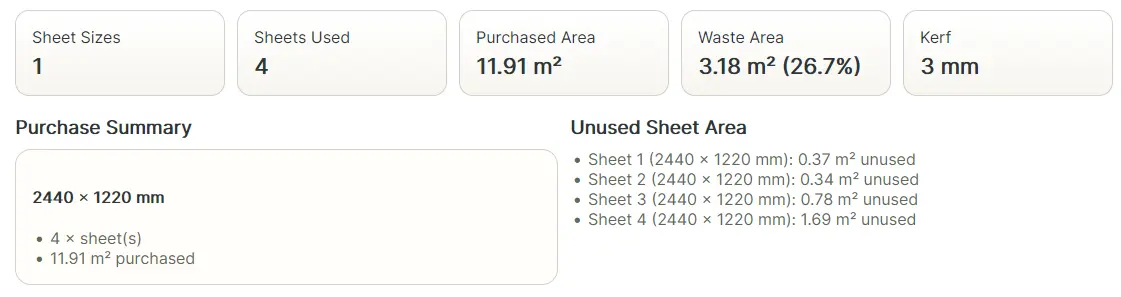
- Shows a purchase summary and a cut plan you can take to the workshop or send to a supplier.
When to Use a Plywood Cut Optimizer
A cut optimizer pays off most when your job involves multiple parts across several sheets. Single-sheet jobs are often manageable by hand, but as soon as you have 10 or more parts spread across three or four boards, manual layout planning becomes slow and error-prone.
- Cabinet carcasses: sides, tops, bottoms, backs, and shelves cut from plywood or MDF.
- Furniture builds: tables, storage units, beds, and workshop fixtures cut from sheet goods.
- Fitted storage: wardrobes, built-in shelving, and pantry units where parts repeat across sheets.
- Van or trailer fit-outs: multiple panel sizes from a small number of full sheets.
- Workshop projects: jigs, storage solutions, and custom panels cut from offcuts or full boards.
Rotation and Grain Direction
Rotation is one of the key decisions in sheet layout planning. Allowing a part to be rotated 90 degrees can significantly improve how it fits alongside other parts on the same board.
For MDF and OSB, grain direction rarely matters, so rotation can be allowed freely. For plywood used in visible applications (cabinet doors, drawer fronts, tabletops) where grain direction may need to match across parts, which limits rotation. The optimizer lets you control this per part so layouts reflect real workshop constraints.
Why Kerf Still Matters for Sheet Cuts
Blade kerf on sheet goods is the same 2–3mm loss per cut as on timber. On a board with four or five rip cuts plus crosscuts, that adds up to 15–20mm or more of lost material. When parts are packed tightly on a board, ignoring kerf can mean parts that were supposed to fit do not, and you end up needing an extra sheet.
Including kerf in the optimizer makes layouts closer to what will actually happen in the workshop. Read more in the Blade Kerf Cutting Guide.
Frequently Asked Questions
- What is a plywood cut optimizer? It places your rectangular parts onto standard sheet sizes to minimize waste and show how many boards to buy, accounting for blade kerf and optional rotation.
- Does it work for MDF and OSB? Yes. The same layout planning works for any rectangular panel material.
- Should I include kerf for sheet cuts? Yes. Kerf is removed material. Including it gives a more realistic layout and prevents running short.
- Is there a free plywood cut optimizer? Sheet goods optimization is a Pro feature, starting at £2 for a 3-day pass or £5/month.
- Can I allow rotation? Yes, per part. Allowing rotation where grain does not matter typically improves nesting efficiency.