
Cut List Optimizer for Timber and Sheet Goods
A free online cut list optimizer (also spelled optimiser) that works out the most efficient way to cut timber lengths and sheet goods from standard stock. Enter your parts, set your stock lengths, include blade kerf, and get a purchase summary and cut plan in seconds.
No signup required. Free for linear timber jobs. Pro unlocks sheet goods and larger projects.
What a Cut List Optimizer Does
A cut list optimizer solves a practical problem that's tedious to work out by hand: given a list of parts you need to cut, which stock lengths should you buy, and how should you cut them to minimize waste?
Without a cut optimizer, most people either overbuy to stay safe or spend time manually sketching cut patterns on paper. The optimizer tests combinations of stock lengths automatically and finds the plan that wastes the least material.
- Works out how many standard lengths to buy for each timber size.
- Accounts for blade kerf on every cut so the plan reflects real material loss.
- Identifies reusable offcuts long enough to use in other jobs.
- Shows a full purchase summary and a cut plan you can take to the workshop.
- Exports results as CSV or PDF for future reference.
How to Use the Cut List Optimizer
The optimizer runs in your browser. No installation needed. Here is the basic workflow for a timber job:
- Set the mode. Choose Linear Timber for dimensional lumber and framing, or Sheet Goods for plywood, MDF and similar panel materials.
- Add a timber size. Enter the cross-section you are working with, such as 2×4 or 100×50mm, and tick the stock lengths your supplier sells.
- Set the blade kerf. A circular saw typically removes 2–3mm per cut. Enter your kerf so the optimizer deducts it from each cut in the plan.
- Enter your cut list. Add each required length and the quantity needed. You can add multiple timber sizes for complex jobs.
- Run the optimizer. The tool calculates the most efficient combination of stock lengths and shows you a full cut plan with a purchase summary.
- Export or save. Download the cut plan as a CSV or PDF, or save the project to your account for later.
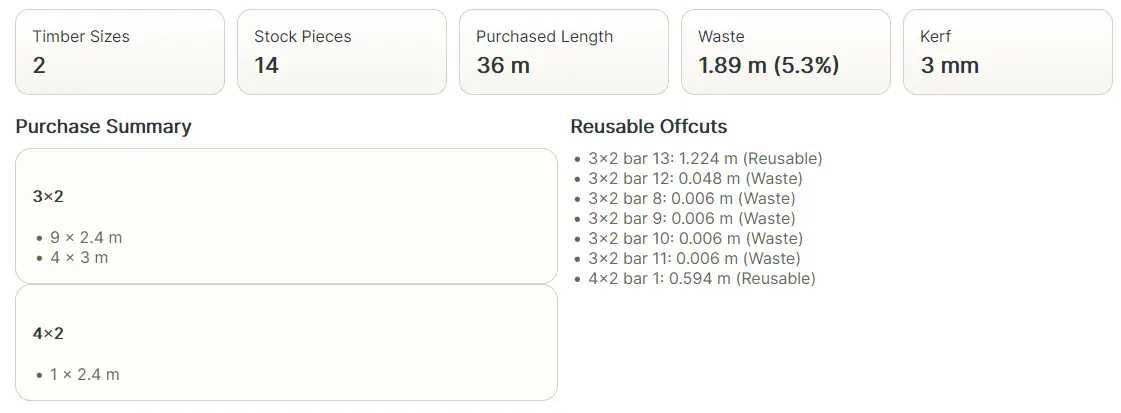
Timber and Sheet Goods Optimization
The optimizer handles two different types of cutting problem.
Linear timber optimization works with dimensional lumber: studs, joists, rafters, rails, and similar parts that are cut to length from standard stock. The optimizer finds the most efficient combination of stock lengths for your cut list, minimizing offcuts and reducing the number of lengths you need to buy.
Sheet goods optimization works with plywood, MDF, OSB, chipboard, and similar panels. Instead of cutting lengths, you are nesting rectangular parts onto standard boards. The optimizer finds layouts that pack your parts efficiently, allowing for rotation where grain direction permits, and shows how many boards to buy.
Both modes account for blade kerf. Both produce a cut plan and a purchase summary. Linear optimization is included free; sheet goods optimization requires a Pro plan.
Why Blade Kerf Matters in a Cut List
Blade kerf is the width of material removed by the saw blade on each cut, typically 2–3mm for a circular saw. On a short cut list it seems negligible. On a full framing job with 40 or 50 cuts, ignoring kerf can mean running short by a full length of timber.
A cut list optimizer that accounts for kerf produces a more accurate plan. The purchase summary reflects real material consumption rather than an optimistic estimate that leaves you short at the worksite.
Read more in the Blade Kerf Cutting Guide.
Who Uses a Cut List Optimizer
- Carpenters and joiners planning stud walls, floor frames, roof structures, and site-built joinery.
- Cabinet makers breaking down plywood and MDF sheets for carcasses, doors, and drawer parts.
- DIY builders pricing and planning timber for garden structures, decking, and home improvement projects.
- Workshop woodworkers cutting parts for furniture, storage, and custom builds.
- Estimators generating accurate material quantities before ordering from a supplier.
Free and Pro Options
The free version of the cut list optimizer covers linear timber jobs with no account required. You can test stock lengths, include kerf, and export results as CSV without paying.
The Pro plan adds sheet goods optimization for plywood, MDF, and OSB, along with PDF export, larger job capacity, and saved project files. Pro is available as a 3-day pass (£2) or a monthly subscription (£5/month).
Frequently Asked Questions
- What is a cut list optimizer? A cut list optimizer works out the most efficient way to cut required lengths or sheet parts from standard stock, minimizing waste and accounting for blade kerf.
- Is there a free cut list optimizer? Yes. The free version supports linear timber jobs with kerf, standard stock lengths, and CSV export. No signup needed.
- What is the difference between a cut list optimizer and a cut list calculator? A cut list calculator totals quantities. An optimizer goes further: it finds which stock to buy and how to cut it to minimize waste.
- Does it work for plywood and sheet goods? Yes, for Pro users. The sheet goods optimizer nests rectangular parts onto standard boards to reduce the number of sheets needed.
- Do I need to sign up? No. Use the free optimizer immediately. Sign in only if you want to save project files.